Tutorials
Helium 10 X-Ray: How to Read the Numbers
AAmazon Tools Buy team Published 23 Nov 2026 5 min read
Quick answer
Helium 10 X-Ray is part of the Helium 10 Chrome extension. Search a keyword on Amazon, click the Helium 10 icon and choose Xray to see estimated sales, revenue, BSR, reviews and price for every product on the page. Judge the whole page, not one big number: check who holds the sales, how many reviews page one has, prices, brands and seasonality.
On this page
- 1.What is Helium 10 X-Ray?
- 2.How to open Helium 10 X-Ray
- 3.What the Helium 10 X-Ray numbers mean
- 4.Five checks before you trust a niche
- 5.Xray Keywords: see what competitors rank for
- 6.Other tools inside the Helium 10 extension
- 7.A 10 minute X-Ray routine for one product idea
- 8.Helium 10 X-Ray tips for sellers in Pakistan
- 9.Mistakes to avoid with Helium 10 X-Ray
- 10.Final thoughts on Helium 10 X-Ray
Helium 10 X-Ray is the tool most Amazon sellers open every single day. It sits inside the Helium 10 Chrome extension and shows estimated sales, revenue, reviews and Best Seller Rank right on top of Amazon, so you can judge a product or a whole niche in seconds.
However, the numbers only help if you know how to read them. This guide explains how to open X-Ray, what each number means, the checks that separate a good niche from a trap, and the extra tools inside the extension that many sellers never use.
What is Helium 10 X-Ray?
X-Ray (Helium 10 also writes it as Xray) is a research tool that analyzes Amazon search results and product pages. According to Helium 10's own description, it shows sales unit estimates, revenue estimates, historical sales trends, review counts and BSR. It can even split sales by variation, such as size or colour, on the same listing.
In short, Black Box helps you find ideas in a database, while X-Ray checks those ideas on the live Amazon page. That is why most sellers use both together, as we explain in our Helium 10 Black Box guide.
How to open Helium 10 X-Ray
- Install the Helium 10 extension from the Chrome Web Store and pin it to your toolbar.
- Log in to your Helium 10 account in the same browser.
- Go to Amazon (for example amazon.com) and search for a keyword, such as "bamboo cutting board".
- Click the Helium 10 icon and choose Xray. A window opens with data for the products on that page.
- To study one product, open its page and run Xray there instead.
If you use Helium 10 through Amazon Tools Buy, the access opens with one click in your own Chrome browser, and the extension works the same way.
What the Helium 10 X-Ray numbers mean
X-Ray shows a summary at the top and a table with one row per product. You can hide columns you do not need with the column settings icon. Here are the numbers that matter most.
| Number | What it tells you | How to use it |
|---|---|---|
| Sales (units) | Estimated units sold in the last 30 days | Shows real demand for each product |
| Revenue | Estimated sales in dollars for the month | Compare the size of each competitor |
| BSR | Best Seller Rank in its category | Lower is better; it drives the sales estimate |
| Reviews and rating | How many reviews and the star average | Few reviews or low stars mean room for you |
| Price | Current selling price | Check there is room for profit after fees |
| Sellers and fulfillment | How many sellers and whether it is FBA | Many sellers on one listing means price fights |
| Size and weight | Size tier and weight | Heavier items cost more to ship and store |
Above the table, X-Ray also shows totals and averages for the page, such as total revenue and average reviews. Helium 10 adds a simple success score that combines demand and competition. Treat it as a starting point, not a final answer.
Five checks before you trust a niche
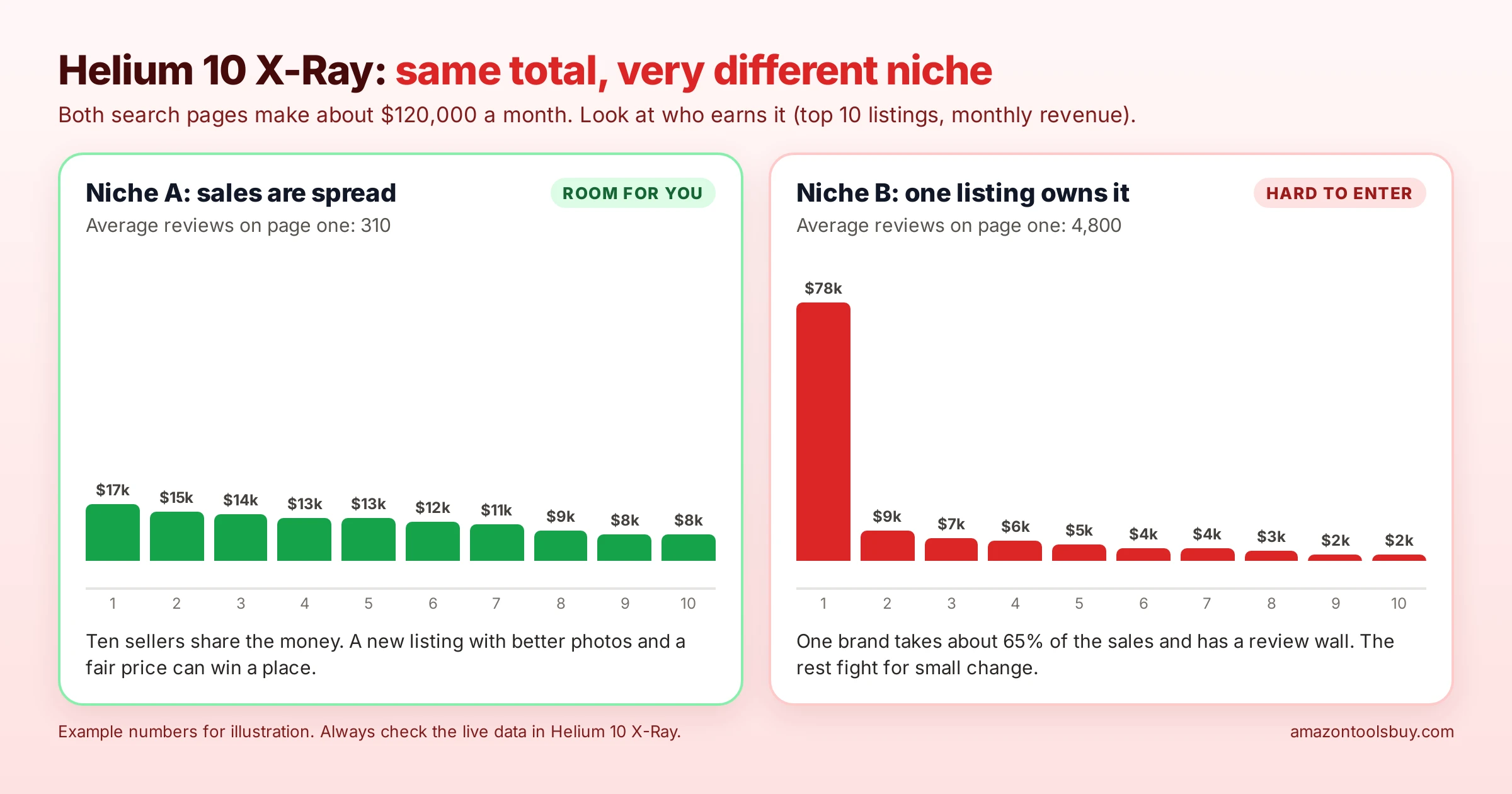
A big total revenue looks exciting, but it can hide a niche that is almost impossible to enter. Therefore, look at the whole page with these checks.
- Who holds the sales: compare the top listings. The example below shows why the same total can mean very different chances.
- Reviews on page one: if most top listings have thousands of reviews, a new product will struggle to rank.
- Price level: when prices are falling or very low, profit disappears after Amazon fees.
- Brand names: if the top spots belong to famous brands, buyers will choose them first.
- Sales history: open the trend for the top products to spot seasonal products.
Xray Keywords: see what competitors rank for
On a search results page, the extension also offers Xray Keywords. As the Helium 10 help center explains, it pulls keywords for the top 10 products on the page and shows them in a pop up window. The data comes from Cerebro and Magnet, so you get search volumes without leaving Amazon.
Use it to build a first keyword list for a niche. Afterwards, run the best competitor through Cerebro for the full picture.

Try it today
Helium 10 Diamond, PKR 2,500 a month
Other tools inside the Helium 10 extension
X-Ray is only one part of the extension. In addition, these tools save a lot of time:
- Profitability Calculator: enter your product and shipping cost to see the profit after FBA and referral fees.
- Inventory Levels: see roughly how much stock a competitor has, which helps you notice when they run out.
- Review tools: download and study reviews to find the problems buyers complain about.
- ASIN Grabber: collect all the ASINs on a page in one click, ready for Cerebro or a spreadsheet.
- Walmart research: the extension also works on Walmart, which is useful if you plan to sell there later.
A 10 minute X-Ray routine for one product idea
- Minute 1 to 2: search the main keyword on Amazon and run X-Ray on page one.
- Minute 3 to 4: read the summary, then sort by revenue and look at the top ten listings.
- Minute 5 to 6: run the five checks above and note any big brand or review wall.
- Minute 7 to 8: open Xray Keywords and copy the five best search terms.
- Minute 9 to 10: open the best competitor, run the Profitability Calculator with your expected cost, and write down the profit per unit.
After ten minutes you know whether the idea deserves more time. If it does, then move on to Cerebro, supplier quotes and samples. If not, simply drop it and test the next one.
Helium 10 X-Ray tips for sellers in Pakistan
- Pick the right marketplace: most sellers here start on Amazon US, so run X-Ray on amazon.com first, then compare with amazon.co.uk if you plan to expand.
- Test local products: search terms like leather wallet, cotton towel or cricket bat show real demand for goods you can source in Pakistan.
- Add real shipping costs: in the Profitability Calculator, include air or sea freight from Pakistan or China, not only the factory price.
- Watch the weight column: lighter products keep both freight and FBA fees low, which matters a lot on a small budget.
Mistakes to avoid with Helium 10 X-Ray
- Treating estimates as facts. Sales numbers are estimates based on BSR, so use them to compare products, not as exact figures.
- Checking only one keyword. Run X-Ray on three or four related searches before you decide.
- Ignoring sponsored results. Ads at the top can push weak products into view, so focus on the organic results.
- Looking only at one day. Open the sales trend, because one strong month can be a season or a sale.
Final thoughts on Helium 10 X-Ray
Helium 10 X-Ray turns any Amazon search into a quick market report. Once you learn to read the whole page instead of one big number, you will reject bad ideas in minutes and focus on the ones worth testing. Through Amazon Tools Buy, you get Helium 10 Diamond with X-Ray, Black Box and Cerebro for PKR 2,500 a month. To choose the right plan first, read our comparison of Helium 10 Platinum vs Diamond.
Frequently asked questions
Is Helium 10 X-Ray free?
The Helium 10 Chrome extension is free to install, but full X-Ray use needs a paid plan. Through Amazon Tools Buy you get Helium 10 Diamond, including X-Ray, for PKR 2,500 a month.
How accurate are X-Ray sales numbers?
They are estimates based on Best Seller Rank and Helium 10 data, so treat them as a guide. They are best for comparing products on the same page, not as exact sales.
How do I open X-Ray on Amazon?
Search a keyword on Amazon, click the Helium 10 icon in Chrome and choose Xray. To study one product, open its page and run Xray there.
What is Xray Keywords?
It pulls the keywords for the top 10 products on an Amazon search page and shows their search volume, using data from Cerebro and Magnet.
Does X-Ray work on Amazon UK and other marketplaces?
Yes. X-Ray works on Amazon marketplaces such as the US and UK, and the extension can also research Walmart.
What is the difference between X-Ray and Black Box?
Black Box searches the Helium 10 database for product ideas with filters, while X-Ray analyzes the live Amazon page you are looking at. Most sellers find ideas in Black Box and check them with X-Ray.
Found this useful?
Share it with a friend who sells on Amazon.
Written by the Amazon Tools Buy team
We help Amazon sellers and freelancers in Pakistan use premium tools like Helium 10, Jungle Scout, Canva Pro and ChatGPT Plus for a fixed price in rupees, with 24/7 WhatsApp support.