Tutorials
Helium 10 Cerebro: Reverse ASIN Guide
AAmazon Tools Buy team Published 23 Nov 2026 5 min read
Quick answer
Helium 10 Cerebro is a reverse ASIN tool: paste up to 10 competitor ASINs and it shows the keywords they rank for, with search volume, organic and sponsored rank, competing products and title density. Filter for volume of 500 or more, competitor rank 1 to 15 and low title density, then build your listing around the core terms and the gaps.
On this page
- 1.What is Helium 10 Cerebro?
- 2.How to run a reverse ASIN search in Helium 10 Cerebro
- 3.The Helium 10 Cerebro columns that matter
- 4.Filters that find the best keywords
- 5.Compare ten competitors to find keyword gaps
- 6.Use the Sponsored view for PPC
- 7.From Cerebro to a listing that ranks
- 8.Helium 10 Cerebro vs Magnet: which one when?
- 9.Helium 10 Cerebro tips for sellers in Pakistan
- 10.Mistakes to avoid
- 11.Which plan includes Cerebro?
- 12.Final thoughts on Helium 10 Cerebro
Helium 10 Cerebro shows you the exact keywords that bring buyers to any Amazon product. You paste a competitor's ASIN, and within seconds you see the search terms it ranks for, how many people search them, and where the product appears in organic results and ads.
This guide explains how to run a reverse ASIN search, what the key columns mean, which filters find the best keywords, and how to compare up to ten competitors at once to spot keyword gaps. Finally, you will see how to turn the results into a listing that ranks.
What is Helium 10 Cerebro?
Cerebro is Helium 10's reverse ASIN tool. Instead of guessing keywords, you start from a product that already sells and look at the search terms that drive its traffic. According to the official Cerebro page, you can analyze up to 10 ASINs side by side and filter by organic rank, search volume and title density.
In other words, Cerebro answers one simple question: what do buyers type before they buy this product? That makes it the best starting point for a new listing or a PPC campaign.
How to run a reverse ASIN search in Helium 10 Cerebro
- Find a strong competitor on Amazon and copy its ASIN from the product page or from X-Ray.
- Open Helium 10 and go to Cerebro.
- Choose the marketplace, for example Amazon US.
- Paste the ASIN. To compare competitors, add up to 10 ASINs.
- Click the search button and wait for the keyword list.
- Use the Organic or Sponsored view to see organic rankings or the keywords the product advertises on.
Above all, pick competitors that are similar to your product in price and features. Otherwise, you will collect keywords that do not fit what you sell.
The Helium 10 Cerebro columns that matter
Cerebro shows many columns. Still, these are the ones most sellers use every day.
| Column | What it means | What to look for |
|---|---|---|
| Search Volume | Estimated monthly searches on Amazon | Enough demand for your product |
| Search Volume Trend | Change over the last 30 days | Rising or stable, not falling fast |
| Organic Rank | Where the ASIN appears in normal results | Top 10 to 15 means the keyword really works |
| Sponsored Rank | Where the ASIN appears in ads | Shows which keywords the competitor pays for |
| Competing Products | Number of results Amazon shows for the keyword | Lower means less crowded |
| Title Density | Page one listings with the keyword in the title | Low density means fewer optimized rivals |
| Cerebro IQ Score | Search volume compared with competing products | Higher suggests demand with less competition |
Remember that search volume is an estimate. For that reason, compare keywords with each other rather than treating any number as exact.
Filters that find the best keywords
A single ASIN can return thousands of keywords, so filters are essential. As a starting point, try these settings and then adjust them for your niche:
- Search volume of at least 500: this removes terms that almost nobody types.
- Competitor organic rank from 1 to 15: as a result, you keep keywords that actually bring sales to that product.
- Title density under 5: shows terms where few page one listings are fully optimized.
- Word count of 3 or more: in addition, this finds long tail phrases, which are cheaper in PPC and easier to rank for.
Next, sort by search volume and review the top 50 terms by hand. Delete anything that describes a different product, a brand name you cannot use, or a feature you do not have.

Try it today
Helium 10 Diamond, PKR 2,500 a month
Compare ten competitors to find keyword gaps
The real power of Cerebro is the multi ASIN search. When you enter several competitors, you can see which keywords many of them rank for and which ones only a few use. The example below shows how to read that comparison.
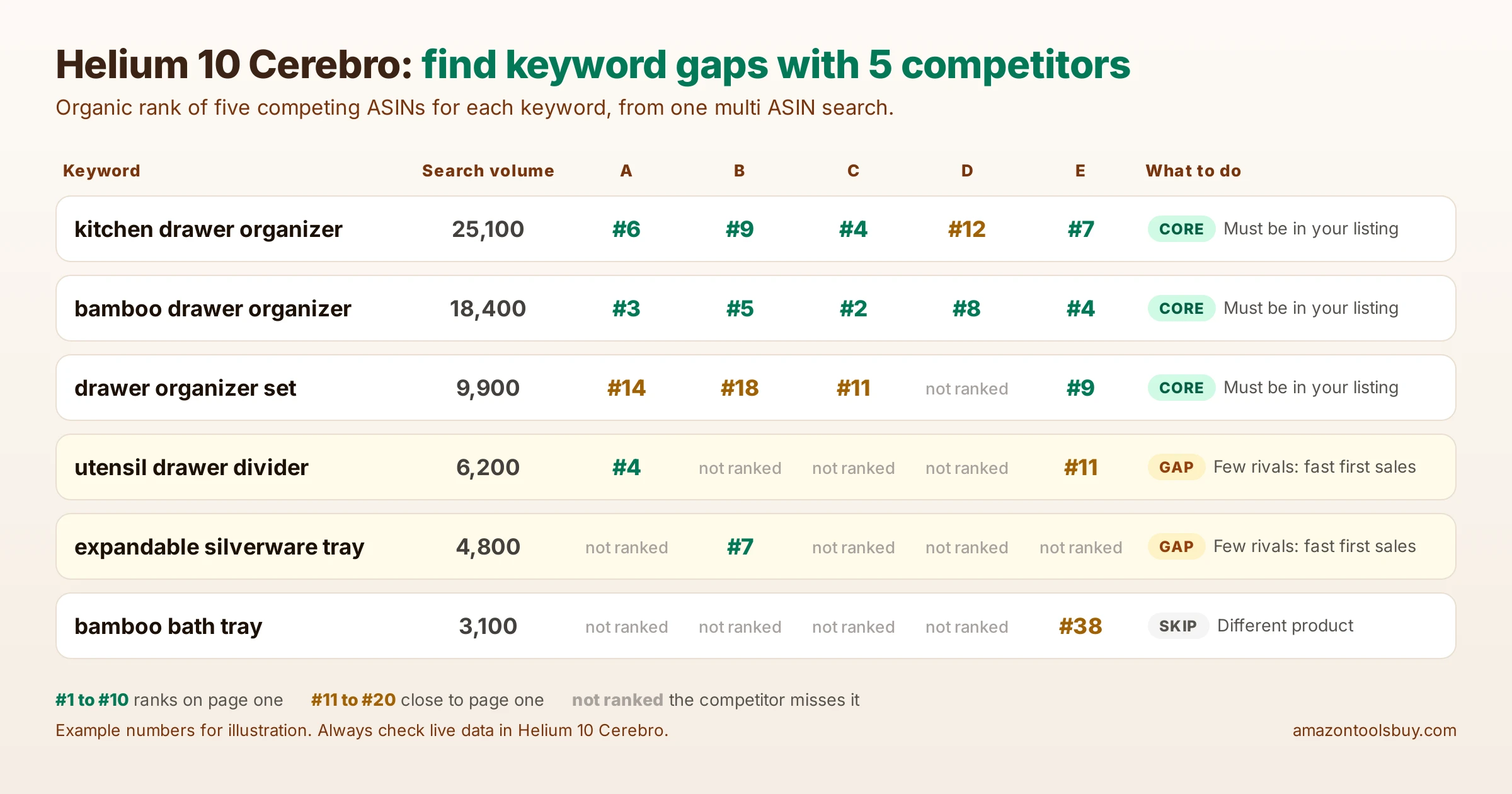
Keywords that most competitors rank for are your core terms, and they must be in your listing. Meanwhile, keywords with good volume where only one or two competitors rank are gaps. Those gaps are often the fastest way for a new product to get its first sales.
Use the Sponsored view for PPC
Switch Cerebro to Sponsored to see where competitors place ads. If a strong competitor keeps paying for a keyword month after month, that keyword probably converts. Then use those terms to build exact and phrase match campaigns, and add irrelevant terms as negatives. Our ChatGPT prompts for Amazon include PPC prompts that help you sort such lists quickly.
From Cerebro to a listing that ranks
- Put your most relevant high volume keyword at the start of the title, and keep the title under Amazon's 75 character limit.
- Place the next most important terms in the Item Highlights field and the first bullet points.
- After that, use the remaining relevant terms naturally in the bullets and description.
- Then add misspellings and extra terms to the backend search terms, staying under 249 bytes.
- After launch, track your main keywords and check Cerebro again every month.
Helium 10 Cerebro vs Magnet: which one when?
Helium 10 has two main keyword tools, and they work in opposite directions. Cerebro starts from a product: you paste an ASIN and see the keywords it already ranks for. Magnet, on the other hand, starts from a word: you type a seed keyword such as "drawer organizer" and get hundreds of related search terms with their volume.
In practice, most sellers use both. First, use Magnet to understand a niche before you have a product. Then, once you know your competitors, use Cerebro to see which of those terms really bring them sales. Finally, combine both lists, remove duplicates and keep only the terms that describe your product.
Helium 10 Cerebro tips for sellers in Pakistan
- Research the right marketplace: run Cerebro on Amazon US for a US launch, because UK buyers use different words, such as trousers instead of pants.
- Check local products: paste ASINs of leather, textile or sports products to see how US buyers really describe them.
- Save your searches: on smaller plans every search counts, so export the results instead of running the same ASIN twice.
Mistakes to avoid
- Choosing competitors that are not really similar to your product, because their keywords will not fit.
- Copying every keyword into the listing, so that it becomes hard to read.
- Ignoring the trend column and, as a result, building a listing around a seasonal term.
- Using brand names of other companies in your title or backend terms.
Which plan includes Cerebro?
Cerebro is part of Helium 10 Platinum and Diamond. However, Platinum allows 100 keyword research searches a month according to the official pricing page, which active researchers use up quickly. Diamond gives higher limits, as we explain in our Helium 10 Platinum vs Diamond comparison.
Through Amazon Tools Buy you get Helium 10 Diamond with Cerebro, Magnet, X-Ray and Black Box for PKR 2,500 a month.
Final thoughts on Helium 10 Cerebro
Helium 10 Cerebro removes the guesswork from keyword research. Start from real competitors, filter hard, look for gaps, and build your listing around the terms buyers actually use. To find the products first, read our Helium 10 Black Box guide, and check each idea with Helium 10 X-Ray.
Frequently asked questions
What does Helium 10 Cerebro do?
Cerebro is a reverse ASIN tool. You paste a competitor ASIN and it shows the keywords that product ranks for, with search volume, organic rank, sponsored rank and more.
How many ASINs can I search in Cerebro at once?
Up to 10 ASINs side by side, according to Helium 10. This shows which keywords many competitors share and which ones only a few use.
What is the Cerebro IQ Score?
It compares search volume with the number of competing products for a keyword. A higher score suggests good demand with less competition.
What is title density in Cerebro?
It shows how many listings on page one have the keyword in their title. Low title density means fewer competitors are fully optimized for that term.
What is the difference between Cerebro and Magnet?
Cerebro starts from a product ASIN and shows the keywords it ranks for. Magnet starts from a seed keyword and suggests related search terms. Most sellers use both.
Which Helium 10 plan includes Cerebro?
Platinum and Diamond. Platinum allows 100 keyword research searches a month, while Diamond has higher limits. Through Amazon Tools Buy you get Diamond for PKR 2,500 a month.
Found this useful?
Share it with a friend who sells on Amazon.
Written by the Amazon Tools Buy team
We help Amazon sellers and freelancers in Pakistan use premium tools like Helium 10, Jungle Scout, Canva Pro and ChatGPT Plus for a fixed price in rupees, with 24/7 WhatsApp support.