Tutorials
Amazon Product Images in Canva: Guide
AAmazon Tools Buy team Published 23 Nov 2026 5 min read
Quick answer
To make Amazon product images in Canva, design at 2000 x 2000 px, remove the photo background with Background Remover, place the product on pure white so it fills about 85% of the image, and keep text and logos off the main image. Then add infographics, a size image and lifestyle scenes, and use Resize for A+ content sizes such as 970 x 600 px.
On this page
- 1.Amazon image rules to know first
- 2.What you need
- 3.How to take the product photo with your phone
- 4.How to make Amazon product images in Canva: the main image
- 5.Infographic Amazon product images in Canva
- 6.Lifestyle images without a photo studio
- 7.Which Amazon product images to make in Canva
- 8.A+ content in Canva
- 9.Tips for sellers in Pakistan
- 10.Mistakes that get Amazon images rejected
- 11.Canva Pro price in Pakistan
- 12.Final thoughts on Amazon product images in Canva
Great photos sell products on Amazon, and you do not need an expensive studio to make them. With Canva you can create Amazon product images that follow the rules: a clean white background main image, clear infographics, lifestyle scenes and even A+ content, all from a good phone photo.
This guide shows you Amazon's image rules first, then walks you step by step through each type of image in Canva, with the right sizes and the mistakes that get images rejected.
Amazon image rules to know first
Amazon is strict about the main image, while the other images give you more freedom. Most seller guides, such as this 2026 image requirements guide, agree on these points:
| Rule | Main image | Other images |
|---|---|---|
| Background | Pure white (RGB 255, 255, 255) | Any background |
| Text, logos and graphics | Not allowed | Allowed |
| Product size in frame | About 85% of the image | Free |
| Image size | At least 1,000 px on the longest side for zoom; 2,000 px is better | Same |
| What is shown | Only the real product you sell | Uses, details, size, lifestyle |
A main image that breaks these rules can be suppressed, which means your listing disappears from search. So get the main image right before anything else.
What you need
- A clear photo of your product: a modern phone is enough. Shoot near a window in daylight, on a plain light surface, and fill most of the frame.
- Canva Pro: the free plan does not include Background Remover or Magic Resize, which save the most time for Amazon images.
- Your brand colours and logo: save them once in the Brand Kit, so every image looks consistent.
How to take the product photo with your phone
Canva can fix a lot, but it cannot fix a blurry or dark photo. Therefore, spend ten minutes on the photo itself.
- Place the product on a white sheet or chart paper near a window, and avoid direct sunlight, which makes hard shadows.
- Turn off the flash and clean the phone lens.
- Hold the phone at the product's height, not from above, so the shape looks natural.
- Take photos from the front, the side, the back and close ups of details such as stitching or buttons.
- Finally, check every photo at full size and keep only the sharp ones.
How to make Amazon product images in Canva: the main image
- In Canva, click Create a design, choose Custom size and enter 2000 x 2000 px.
- Upload your product photo and drag it onto the page.
- Click the photo, open Edit and choose Background Remover. Canva cuts out the product in a few seconds.
- Make sure the page background is pure white (#FFFFFF).
- Resize the product so that it fills about 85% of the square, and centre it.
- Use Magic Eraser to remove dust, stickers or small marks that are not part of the product.
- Download as JPG or PNG in the highest quality.
Afterwards, zoom in to check the edges. If you see grey halos around the product, use the eraser or take a better photo, because rough edges look cheap in search results.
Infographic Amazon product images in Canva
Infographics show buyers in one look why your product is better. In Canva, search the templates for "product infographic", pick a clean layout and replace the content.
- Use three or four short callouts, for example "BPA free", "Fits 12 to 18 inch drawers" or "5 year warranty".
- Make the text big, because most buyers shop on a phone.
- Add a dimensions image with real measurements, since size questions cause many returns.
- Keep your brand colours from the Brand Kit on every image.
Try it today
Canva Pro, PKR 500 a month
Lifestyle images without a photo studio
Lifestyle images show the product in use, which helps buyers imagine owning it. However, a photo shoot is expensive, so many sellers build them in Canva instead.
First, remove the background from your product photo. Then place it on a realistic background photo from Canva's library, such as a kitchen counter or an office desk. Next, add a soft shadow so the product does not look like it is floating. Canva's Magic Studio tools, such as Magic Expand and Magic Edit, can also extend or adjust a scene. Above all, keep the product itself accurate, because buyers will complain if it looks different in real life.
Which Amazon product images to make in Canva
Amazon shows several image slots on every listing. The plan below shows what to put in each one and which size to design in Canva.
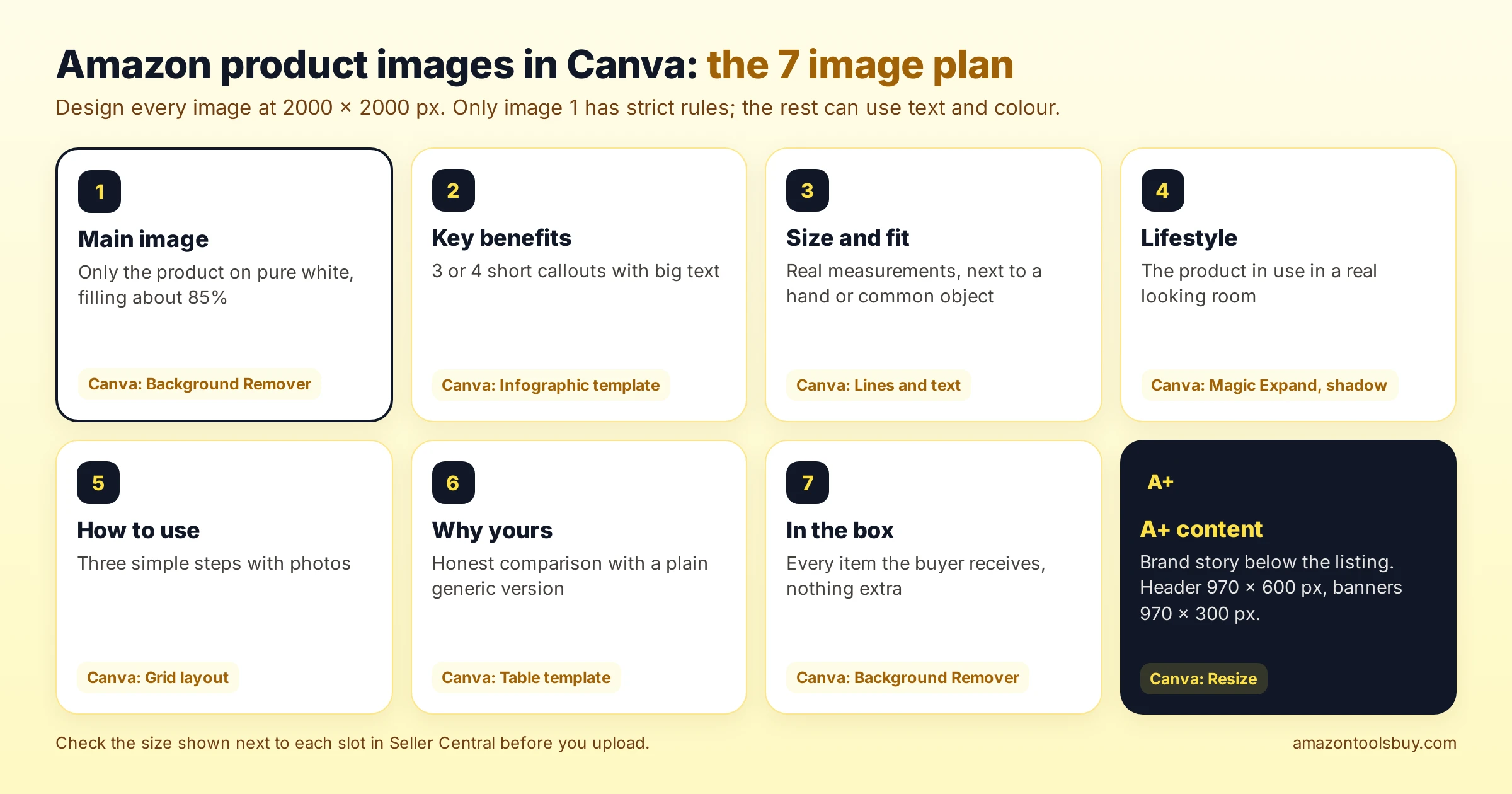
A+ content in Canva
If you have a registered brand, A+ content adds images and text below your listing. In Canva, create a custom size for each module. Common sizes are 970 x 600 px for the standard header, 970 x 300 px for wide banners and 300 x 300 px for small images, while the company logo is 600 x 180 px.
Still, Amazon changes its modules from time to time, so check the size shown next to each slot in A+ Content Manager. Then use Canva's Resize (Magic Resize) to turn one design into every size you need, instead of starting again.
Tips for sellers in Pakistan
- Shoot samples carefully: photograph the sample from your supplier before mass production, so you can launch with images on day one.
- Use the factory: if you source in Pakistan, take extra photos at the workshop showing materials and craft, which work well as lifestyle images.
- Save money: a photographer can cost much more than a month of Canva Pro, and you will update images many times.
Mistakes that get Amazon images rejected
- An off white or grey background on the main image.
- Text, badges or watermarks on the main image.
- Showing extra items that are not included in the box.
- Small images below 1,000 px, which turn off zoom.
- Fake claims such as "best seller" or awards you do not have.
Canva Pro price in Pakistan
Canva's own Pro plan costs about Rs 9,200 a year in Pakistan, paid upfront by card. Through Amazon Tools Buy you get Canva Pro for PKR 500 a month, paid by JazzCash, EasyPaisa, bank transfer or Binance (USDT), with Background Remover, Magic Resize, Brand Kit and Magic Studio included.
Final thoughts on Amazon product images in Canva
Amazon product images in Canva can look as good as studio photos if you follow the rules and keep each image focused on one message. Start with a perfect white main image, add three or four clear infographics, and finish with lifestyle scenes. For the text side of your listing, use our ChatGPT prompts for Amazon, and read our guide to selling on Amazon from Pakistan.
Frequently asked questions
Can I make Amazon product images with Canva?
Yes. With Canva Pro you can remove the background, place the product on pure white, and make infographics, lifestyle images and A+ content from a good phone photo.
What size should Amazon product images be?
Use at least 1,000 px on the longest side so zoom works; 2,000 x 2,000 px is a safe size for all listing images. Check the size shown in Seller Central for A+ modules.
What are the rules for the Amazon main image?
A pure white background (RGB 255, 255, 255), only the real product you sell, filling about 85% of the image, and no text, logos or extra items.
Does free Canva have a background remover?
No. Background Remover is a Canva Pro feature, as are Magic Resize and the Brand Kit, which are the tools that save the most time for Amazon images.
What size is Amazon A+ content?
Common sizes are 970 x 600 px for the standard header, 970 x 300 px for banners and 300 x 300 px for small images. Amazon shows the exact size next to each slot in A+ Content Manager.
How much is Canva Pro in Pakistan?
Canva's own Pro plan is about Rs 9,200 a year paid by card. Through Amazon Tools Buy you get Canva Pro for PKR 500 a month by JazzCash, EasyPaisa, bank transfer or Binance (USDT).
Found this useful?
Share it with a friend who sells on Amazon.
Written by the Amazon Tools Buy team
We help Amazon sellers and freelancers in Pakistan use premium tools like Helium 10, Jungle Scout, Canva Pro and ChatGPT Plus for a fixed price in rupees, with 24/7 WhatsApp support.