Tutorials
Helium 10 Black Box: Find Winning Products
AAmazon Tools Buy team Updated 23 Nov 2026 6 min read
Quick answer
Helium 10 Black Box searches hundreds of millions of Amazon listings and keeps only the products that match your filters. Start on the Products tab with monthly revenue over $10,000, a price of $20 to $60, under 200 reviews and a weight under 2 lb, then check page one, keyword demand, season and profit before you order samples.
On this page
- 1.What is Helium 10 Black Box?
- 2.The five tabs inside Helium 10 Black Box
- 3.How to use Helium 10 Black Box step by step
- 4.The best filters for new sellers
- 5.How to read a result and check if it is a winner
- 6.Use Black Box with AI through MCP
- 7.Tips for Pakistani sellers
- 8.Mistakes to avoid
- 9.Which Helium 10 plan includes Black Box?
- 10.Final thoughts on Helium 10 Black Box
Most new Amazon sellers lose weeks scrolling Amazon and guessing what sells. Helium 10 Black Box fixes that. In short, it is a product research tool that searches hundreds of millions of Amazon listings and shows only the products that match your numbers, such as sales, price and number of reviews.
This guide shows you exactly how to use it: what each tab does, which filter values to start with, how to read the results, and how to check an idea before you spend money on stock. We also share a few tips that matter for sellers in Pakistan.
What is Helium 10 Black Box?
Black Box is the main product research tool inside Helium 10. First, you set filters. Then you click Search, and it returns products that fit, with their estimated monthly sales, revenue, price, reviews and Best Seller Rank. According to Helium 10's own blog, its database covers more than 450 million Amazon listings.
In other words, Black Box does not tell you what to sell. Instead, it removes the products that clearly do not fit, so you only study the ones that might. You can see the official feature page on the Helium 10 website.
The five tabs inside Helium 10 Black Box
Black Box has five search modes. Three of them search with words, while two of them start from an ASIN (the product ID on Amazon).
| Tab | You search with | Use it to |
|---|---|---|
| Products | Category, filters and optional keywords | Find product ideas by sales, price, reviews and size |
| Keywords | Words and keyword filters | Find search terms with demand and a weak first page |
| Competitors | One ASIN | See the products that share the most keywords with it |
| Niche | A search phrase | Filter Amazon search results without opening Amazon |
| Product Targeting | One ASIN | Find ASINs to target with Amazon ads |
In the beginning, you will spend most of your time on the Products tab. Later, the Keywords and Competitors tabs help you confirm an idea. You can read more about the Niche tab in the Helium 10 help center.
How to use Helium 10 Black Box step by step
- Open Helium 10, go to Black Box and stay on the Products tab.
- Choose the marketplace. Most sellers in Pakistan start with Amazon US.
- Pick one to three categories you understand, such as Home and Kitchen or Sports and Outdoors.
- Set your starting filters. The next section gives you values that work well for beginners.
- Open Advanced Filters. Then choose FBA as the fulfillment type and exclude big brand names from the title.
- Click Search and sort the results by monthly revenue.
- Save the interesting products, and save your filters too, so you can run the same search next week.
Above all, keep the filters tight. Black Box only shows a limited number of results for each search, so a broad search hides good products behind thousands of weak ones.

Try it today
Helium 10 Diamond, PKR 2,500 a month
The best filters for new sellers
There are no magic numbers. However, these starting values come from Helium 10's own examples and the rules most private label sellers use. Change them to suit your category and budget.
| Filter | Starting value | Why |
|---|---|---|
| Monthly revenue | $10,000 or more | Proves people really buy this product |
| Monthly sales | 300 units or more | Steady orders, not one lucky month |
| Price | $20 to $60 | Room for profit after Amazon fees |
| Review count | Under 200 | A new listing can still catch up |
| Review rating | Under 4.3 stars (optional) | Unhappy buyers mean you can make it better |
| Weight | Under 2 lb | Cheaper shipping and lower FBA fees |
| Size tier | Standard size | Avoids high oversize fees |
| Fulfillment | FBA | Shows products sold the way you will sell |
Black Box also has ready presets, such as Low Rating and Small and Light. They are a quick way to start if you do not want to set every field yourself.
How to read a result and check if it is a winner
Still, a product that passes the filters is only an idea. Before you contact a supplier, look at each result the way the example below does.
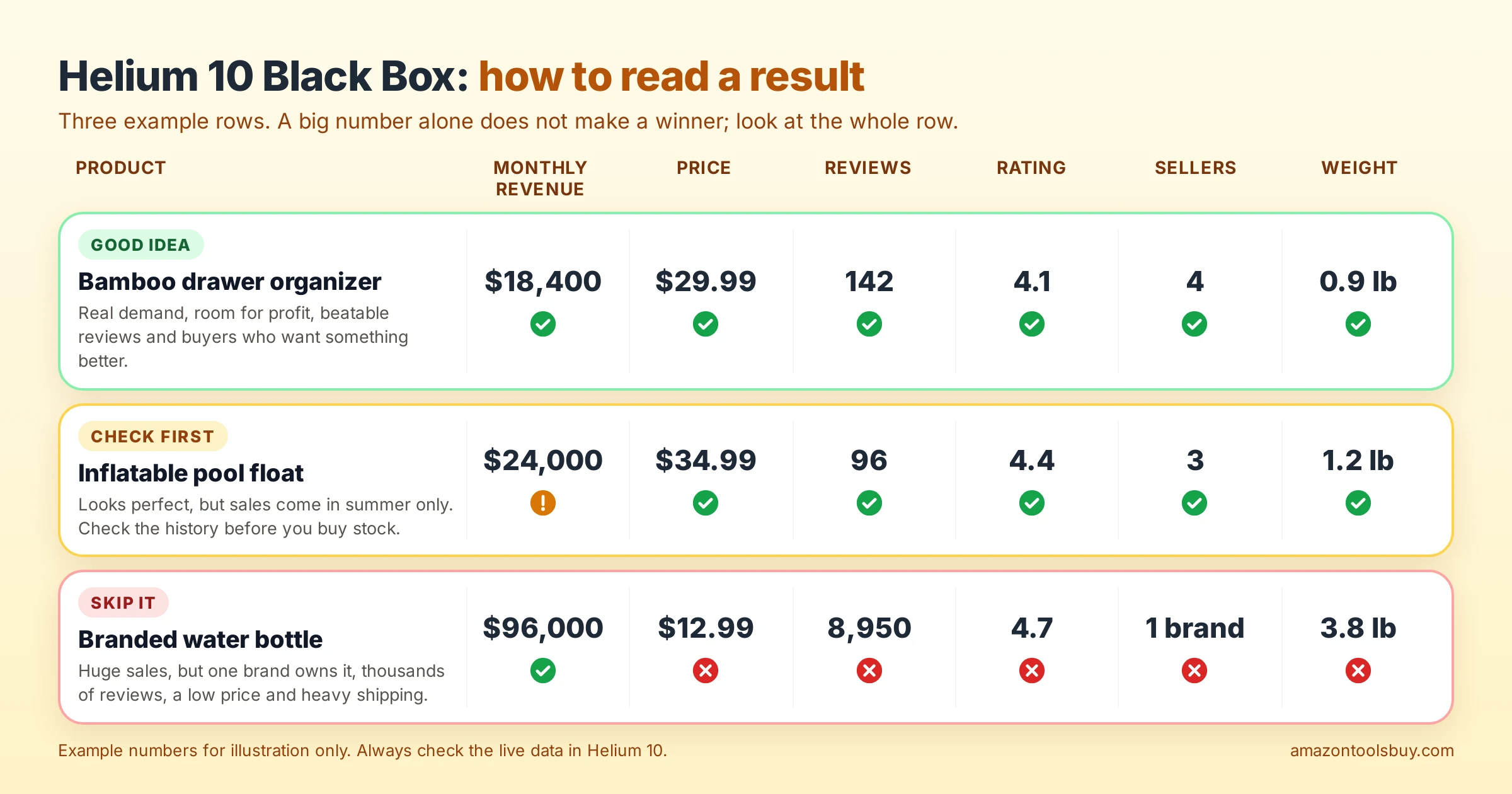
Next, confirm the idea with four quick checks:
- Page one on Amazon: search the main keyword and open the Helium 10 X-Ray extension. Sales should be spread over several sellers, not held by one big brand.
- Keyword demand: run the main keyword through Cerebro or Magnet to see real search volume.
- Season: check the sales history. Christmas or summer products can look great for one month and then stop.
- Profit: use the Helium 10 profitability calculator. Aim for at least 30 percent profit after product cost, shipping and all Amazon fees.
Finally, check that the product is not patented, restricted or hazardous. If an idea passes all of this, then it is worth ordering samples.
Use Black Box with AI through MCP
Since 2026, Helium 10 Diamond users can also run Black Box searches from Claude or ChatGPT. In addition, the Helium 10 MCP connection includes a search products tool that uses the same database, with filters for category, revenue, price, BSR, reviews, rating and unit sales.
For example, you can type: "Use search_products to find active Amazon products in the Kitchen and Dining category with monthly revenue above $15,000 and fewer than 200 reviews." Our Helium 10 MCP guide shows how to connect it step by step.
Tips for Pakistani sellers
- Search what Pakistan makes: type words like leather, cotton, towel, cricket or Himalayan salt into the Products tab. Then you can see real demand for goods you can source locally and check in person.
- Small and light wins: air freight from Pakistan or China is charged by weight, so keep the weight filter low for your first product.
- Match your budget: a product that sells 300 units a month needs stock for at least two months. Multiply your landed cost per unit by 600 before you commit.
- Avoid tricky categories first: skip glass, liquids, batteries and anything that needs approval until you have experience.
Mistakes to avoid
- Trusting one number. Estimates can be off, so always look at page one yourself.
- Chasing the highest revenue. After all, big revenue often means big brands and heavy ad spending.
- Ignoring fees. A $15 product can lose money after referral and FBA fees.
- Copying a product exactly. Instead, read the bad reviews and fix the problems buyers complain about.
Which Helium 10 plan includes Black Box?
Full Black Box access comes with the Platinum and Diamond plans. Officially, Platinum costs $129 a month and Diamond costs $359 a month on monthly billing (checked November 2026). However, the free plan only allows a few searches, which is not enough for real research.
On the other hand, through Amazon Tools Buy you get Helium 10 Diamond for PKR 2,500 a month, paid by JazzCash, EasyPaisa, bank transfer or Binance (USDT). As a result, you get Black Box, X-Ray, Cerebro and the profitability calculator without a dollar card.
Try it today
Helium 10 Diamond, PKR 2,500 a month
Final thoughts on Helium 10 Black Box
Helium 10 Black Box will not pick a product for you, but it turns weeks of guessing into an hour of focused research. So start with tight filters, shortlist 20 to 30 ideas, check the best five properly, and launch one. For more help, read our guides to product hunting tools in Pakistan and selling on Amazon from Pakistan, or compare Helium 10 vs Jungle Scout first.
Frequently asked questions
What is Helium 10 Black Box used for?
It is a product research tool. You set filters such as monthly revenue, price, reviews and weight, and it shows Amazon products that match, so you can find product ideas without guessing.
What are good Black Box filters for beginners?
A good start is monthly revenue of $10,000 or more, 300 or more sales a month, a price of $20 to $60, fewer than 200 reviews, a weight under 2 lb and FBA as the fulfillment type. Adjust them for your category.
Is Helium 10 Black Box free?
The free plan only allows a few searches. Full access comes with the Platinum and Diamond plans. Through Amazon Tools Buy you get Helium 10 Diamond for PKR 2,500 a month.
Are Black Box sales numbers accurate?
They are estimates based on Best Seller Rank, so treat them as a guide. Always check page one on Amazon with X-Ray and look at the sales history before you buy stock.
Can I use Black Box from Pakistan?
Yes. Helium 10 works in any browser, and you can research Amazon US, UK and other marketplaces from Pakistan. You do not need a dollar card if you get access through us.
Can I use Black Box with ChatGPT or Claude?
Yes. With Helium 10 Diamond, the Helium 10 MCP connection lets Claude or ChatGPT run product searches on the same database. Our Helium 10 MCP guide shows the setup.
Found this useful?
Share it with a friend who sells on Amazon.
Written by the Amazon Tools Buy team
We help Amazon sellers and freelancers in Pakistan use premium tools like Helium 10, Jungle Scout, Canva Pro and ChatGPT Plus for a fixed price in rupees, with 24/7 WhatsApp support.