Tutorials
Jungle Scout Product Database Tutorial
AAmazon Tools Buy team Published 23 Nov 2026 5 min read
Quick answer
The Jungle Scout Product Database searches about 475 million Amazon products by filters such as price, monthly units, revenue, reviews, weight and seller type. Start with a price of $20 to $60, 300 or more units a month and under 200 reviews, add the best ideas to the Product Tracker for one or two weeks, and only then order samples.
On this page
- 1.What is the Jungle Scout Product Database?
- 2.How to use the Jungle Scout Product Database step by step
- 3.The best Jungle Scout Product Database filters for beginners
- 4.How to read the results
- 5.Check an idea with the Product Tracker
- 6.Jungle Scout Product Database vs Opportunity Finder
- 7.A 30 minute weekly routine with the Jungle Scout Product Database
- 8.Tips for sellers in Pakistan
- 9.Mistakes to avoid
- 10.Jungle Scout price and the cheaper way
- 11.Final thoughts on the Jungle Scout Product Database
The Jungle Scout Product Database is one of the fastest ways to find product ideas on Amazon. Instead of scrolling Amazon for hours, you set a few filters and get a list of real products with their estimated sales, revenue, price and reviews.
This beginner tutorial shows you how the tool works, which filters to use, how to read the results, and how to check an idea with the Product Tracker before you spend money on stock. It also covers the Jungle Scout price and the cheaper way to use it from Pakistan.
What is the Jungle Scout Product Database?
The Product Database is Jungle Scout's main product research tool. According to the official Product Database page, it is a searchable catalog of about 475 million products pulled from Amazon. You can sort results by category, estimated sales, sales rank and revenue, save your favourite filters as presets, and export the results to a spreadsheet.
In short, it works like a search engine for products. You decide what a good product looks like, and the database shows you every product that matches.
How to use the Jungle Scout Product Database step by step
- Log in to Jungle Scout and open Product Database from the menu.
- Choose the marketplace, for example the US.
- Pick one to three categories you understand well.
- Set your filters, starting with the values in the next section.
- Click Search and sort the results by monthly revenue or units sold.
- Add interesting products to the Product Tracker and save your filters as a preset.
Keep your first searches narrow. A broad search shows thousands of products, and the good ideas get lost among famous brands.
The best Jungle Scout Product Database filters for beginners
Jungle Scout offers filters such as category, price, monthly units sold, monthly revenue, reviews, rating, weight, number of sellers, seller type and Listing Quality Score. Filter names can change, so check the app. As a starting point, try these values:
| Filter | Starting value | Why |
|---|---|---|
| Price | $20 to $60 | Room for profit after Amazon fees |
| Monthly units sold | 300 or more | Steady demand |
| Monthly revenue | $8,000 or more | The niche is worth the effort |
| Reviews | Under 200 | A new listing can still compete |
| Weight | Under 2 lb | Lower shipping and FBA fees |
| Seller type | FBA | Shows products sold like yours will be |
| Listing Quality Score | Low scores (optional) | Weak listings you can beat with better images and text |
These are not magic numbers. However, they remove most products that are too small, too crowded or too heavy for a first launch.

Try it today
Jungle Scout, PKR 2,500 a month
How to read the results
Each row shows one product with its price, estimated monthly sales and revenue, reviews, rating and rank. Look at a few things together, not one number alone.
- Several similar products doing well: this means real demand, not one lucky listing.
- Low reviews with good sales: buyers are still choosing new products in this niche.
- Low rating or weak listings: unhappy buyers give you a chance to sell a better version.
- Big brands at the top: on the other hand, these are hard to beat for a new seller.
Remember that sales numbers are estimates. Therefore, use them to compare products, and always check the live Amazon page before you decide.
Check an idea with the Product Tracker
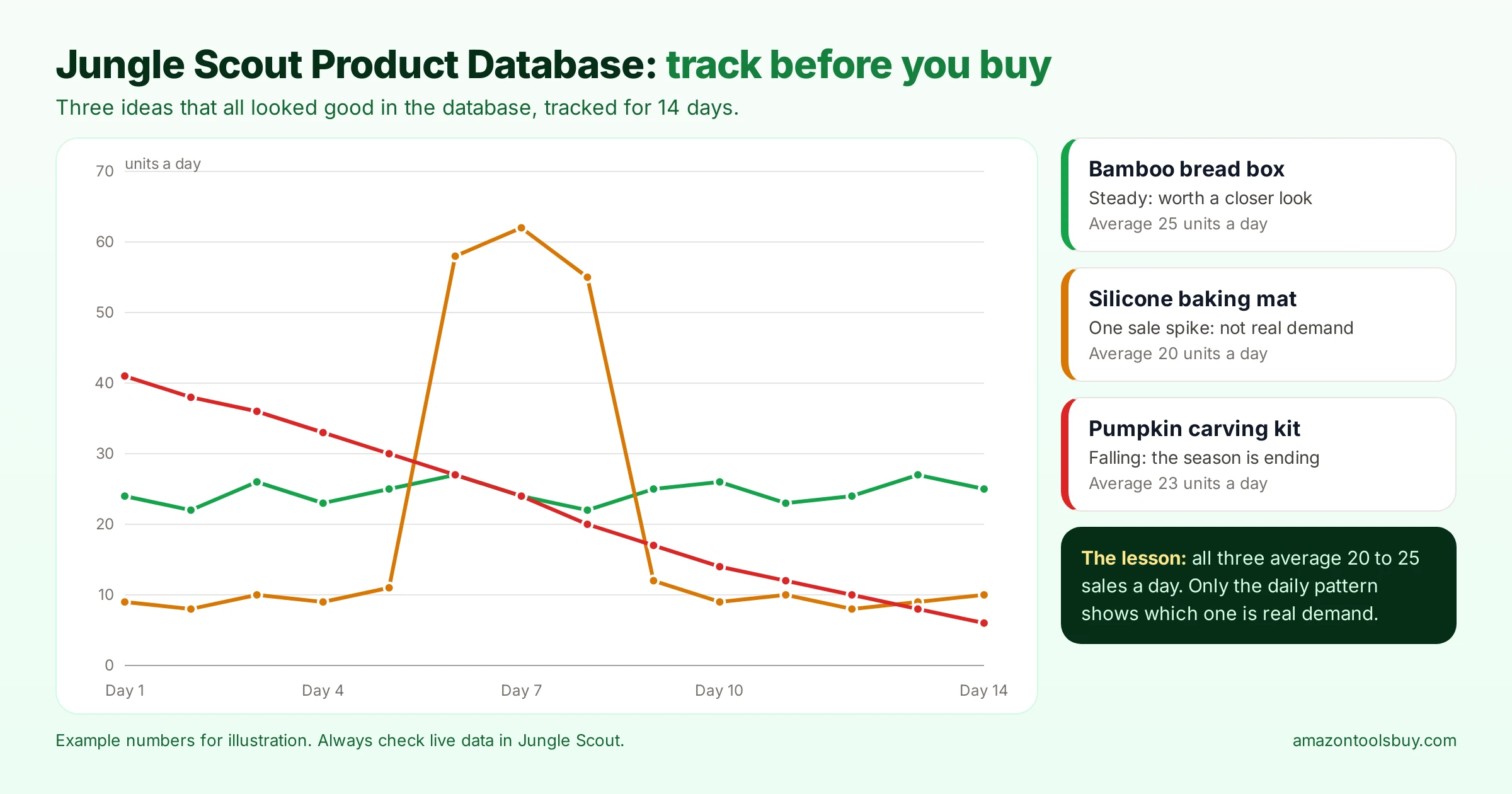
One month of data can mislead you, for example during a sale or a season. That is why experienced sellers track a shortlist for one or two weeks before contacting suppliers. The Product Tracker records the daily sales, price and rank of each product you add, so you can see the real pattern.
Jungle Scout Product Database vs Opportunity Finder
Jungle Scout has two research tools that work together. The Product Database finds single products, while Opportunity Finder looks at whole niches, using keywords with their demand and competition. Many sellers start in Opportunity Finder to pick a niche, and then use the Product Database to study the products inside it.
After that, Keyword Scout and the Chrome extension help you confirm demand and check competitors on Amazon. If you are still choosing between tools, read our comparison of Helium 10 vs Jungle Scout.
A 30 minute weekly routine with the Jungle Scout Product Database
Product research works best as a habit, not a one time search. So block 30 minutes every week and follow the same steps.
- Minutes 1 to 5: load your saved preset and run it on one new category.
- Minutes 6 to 15: scan the top results and add five to ten promising products to the Product Tracker.
- Minutes 16 to 25: review last week's tracked products and delete any with falling or spiky sales.
- Minutes 26 to 30: for the one or two ideas that still look good, open the Amazon page and read the negative reviews.
After a month, you will have a short list of tested ideas instead of a long list of guesses. At that point, ask suppliers for quotes and order samples for the best one.
Tips for sellers in Pakistan
- Search for local strengths: use the keyword include filter with words such as leather, cotton or cricket to find products you can source in Pakistan.
- Watch the weight: air freight from Pakistan or China is charged by weight, so light products protect your margin.
- Save presets: keep one preset for small, light products and another for higher priced items, and run them every week.
- Calculate landed cost: add product cost, freight and Amazon fees before you trust any profit estimate.
Mistakes to avoid
- Choosing a product only because its revenue is high.
- Ignoring seasonal products that sell for one or two months a year.
- Copying a product exactly instead of improving on its weaknesses.
- Ordering stock before you track sales and order samples.
Jungle Scout price and the cheaper way
Jungle Scout's monthly plans start at $49 for Starter, with Growth Accelerator at $79 and Brand Owner at $149, paid by international card. Through Amazon Tools Buy you get Jungle Scout for PKR 2,500 a month, paid by JazzCash, EasyPaisa, bank transfer or Binance (USDT), and it opens with one click in your own Chrome browser.
Final thoughts on the Jungle Scout Product Database
The Jungle Scout Product Database turns product research into a clear process: filter, shortlist, track and then decide. Start with narrow filters, track your best five ideas for two weeks, and only then order samples. For more ideas, read our guide to product hunting tools in Pakistan and our guide to selling on Amazon from Pakistan.
Frequently asked questions
What is the Jungle Scout Product Database?
It is Jungle Scout's product research tool, a searchable catalog of about 475 million Amazon products that you filter by price, sales, revenue, reviews, weight and more to find product ideas.
What are good Product Database filters for beginners?
A good start is a price of $20 to $60, 300 or more units a month, at least $8,000 monthly revenue, under 200 reviews, a weight under 2 lb and FBA as the seller type.
How accurate are Jungle Scout sales estimates?
They are estimates, so use them to compare products. Track your best ideas in the Product Tracker for one or two weeks to see the real daily pattern before you buy stock.
What is the difference between Product Database and Opportunity Finder?
The Product Database finds single products, while Opportunity Finder looks at whole niches through keywords with their demand and competition. Many sellers use both together.
How much does Jungle Scout cost?
Monthly plans start at $49 for Starter, with Growth Accelerator at $79 and Brand Owner at $149, paid by international card.
Can I use Jungle Scout in Pakistan without a card?
Yes. Through Amazon Tools Buy you get Jungle Scout for PKR 2,500 a month, paid by JazzCash, EasyPaisa, bank transfer or Binance (USDT).
Found this useful?
Share it with a friend who sells on Amazon.
Written by the Amazon Tools Buy team
We help Amazon sellers and freelancers in Pakistan use premium tools like Helium 10, Jungle Scout, Canva Pro and ChatGPT Plus for a fixed price in rupees, with 24/7 WhatsApp support.