Tutorials
Helium 10 MCP: Claude and ChatGPT Guide
AAmazon Tools Buy team Published 23 Nov 2026 6 min read
Quick answer
Helium 10 MCP connects your Helium 10 Diamond account to AI assistants like Claude and ChatGPT, so you can ask research questions in plain English and get real Amazon data back. Add the server https://mcp.helium10.com/mcp as a connector, sign in to Helium 10, click Authorize, then start your questions with "Using Helium 10".
On this page
- 1.What is Helium 10 MCP?
- 2.What you need before you start
- 3.How to connect Helium 10 MCP to Claude
- 4.How to connect Helium 10 MCP to ChatGPT
- 5.For developers: Claude Code
- 6.What Helium 10 MCP can do
- 7.10 Helium 10 MCP prompts for Amazon sellers
- 8.Tips for better Helium 10 MCP answers
- 9.Troubleshooting common problems
- 10.Is it safe to connect Helium 10 to AI?
- 11.Final thoughts on Helium 10 MCP
Imagine asking a simple question in plain English, such as "find kitchen products with high sales and few reviews", and getting real Amazon data back in seconds. That is exactly what Helium 10 MCP does. It connects Helium 10 to AI assistants like Claude and ChatGPT, so the AI can pull live research data for you instead of guessing.
This guide explains what Helium 10 MCP is, what you need, how to connect it step by step to Claude and ChatGPT, and the prompts that give the most useful answers for Amazon sellers.
What is Helium 10 MCP?
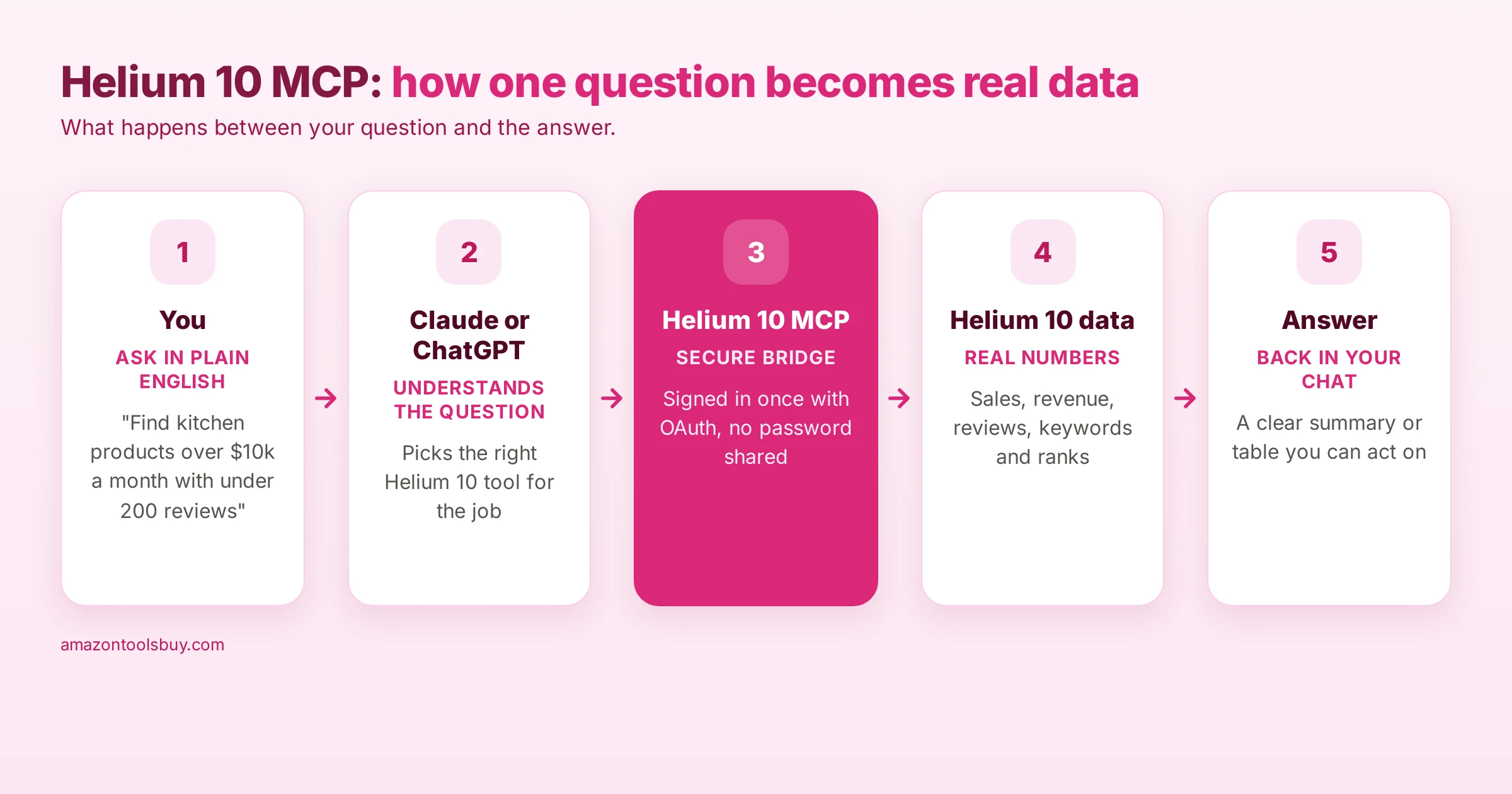
MCP stands for Model Context Protocol. It is an open standard that lets an AI assistant use outside tools safely. In simple words, it is a bridge. On one side is your AI chat, and on the other side is Helium 10 with its keyword and product data.
Without MCP, ChatGPT or Claude can only use general knowledge, which is often old or too vague for Amazon. With Helium 10 MCP, the AI can call Helium 10 directly, look up real numbers, and then explain them in plain words. You can read the official overview on the Helium 10 MCP page.
What you need before you start
- Helium 10 Diamond: MCP access comes with the Diamond plan and higher. With Amazon Tools Buy you get Helium 10 Diamond for PKR 2,500 a month.
- An AI assistant that supports MCP: Claude (web, desktop or Claude Code) or ChatGPT with developer mode. Usually a paid plan is needed for custom connectors.
- Google Chrome: you sign in to Helium 10 in the browser once, to approve the connection.

Try it today
Helium 10 Diamond, PKR 2,500 a month
How to connect Helium 10 MCP to Claude
First of all, Claude supports remote MCP servers as custom connectors. Follow these steps.
- Open Claude and go to Settings, then Connectors. On desktop, click your name in the lower left corner first.
- Click Add custom connector.
- Type a name such as Helium 10, and paste this server address: https://mcp.helium10.com/mcp
- Click Add, then Connect. A browser window opens.
- Sign in to Helium 10 if asked, and click Authorize.
- Back in Claude, the connector now shows Connected. No restart is needed.
Now start a new chat and begin your question with "Using Helium 10". As a result, Claude knows it should call the Helium 10 tools.

Try it today
Claude, PKR 2,500 a month
How to connect Helium 10 MCP to ChatGPT
ChatGPT, on the other hand, adds MCP servers through its developer mode and apps. The steps are similar.
- Open ChatGPT Settings and turn on Developer Mode.
- Go to Apps and create a new app.
- Paste the MCP server address: https://mcp.helium10.com/mcp
- Sign in to Helium 10 in the browser window that opens, and approve access.
- Scan the available tools and enable the ones you want.
ChatGPT changes its menus from time to time, so the names may look slightly different. If something does not match, the official steps are kept up to date on Helium 10's GitHub page. You can also message us on WhatsApp and we will help you set it up.
For developers: Claude Code
If you use Claude Code in the terminal, one command adds the server, and then a browser login completes the setup.
claude mcp add helium10-mcp --transport http https://mcp.helium10.com/mcpWhat Helium 10 MCP can do
Keep in mind that the tools you see depend on your Helium 10 plan and connected marketplaces. Here are the main groups and what they are good for.
| Toolset | What it gives you | Example question |
|---|---|---|
| Keyword research | Reverse ASIN keywords, keyword ideas and search volume | Which keywords does this competitor rank for? |
| Product research | Products filtered by sales, revenue, price and reviews | Find products over $10k a month with under 200 reviews |
| Brand Analytics | Amazon's top search terms | What are the top searches in this niche? |
| Keyword tracking | Ranks over time and new keyword suggestions | Where did my product move this week? |
| Listings | Listing details, quality score and comparisons | Compare my listing with the top three competitors |
| Profits, inventory and ads | Data from the seller account linked to Helium 10 | Which products might run out of stock? |
10 Helium 10 MCP prompts for Amazon sellers
In general, good prompts are specific. Include the marketplace, an ASIN or a category, and what you want to see. Here are ten that work well.
- Using Helium 10, show the top 20 keywords ASIN B0XXXXXXXX ranks for, sorted by search volume.
- With Helium 10, find active products in the kitchen category with monthly revenue over $10,000 and fewer than 200 reviews.
- Using Helium 10, compare these three ASINs and tell me which listing is weakest and why.
- Ask Helium 10 for 30 long tail keyword ideas for "bamboo cutting board", with search volume.
- Using Helium 10, what are the top Brand Analytics search terms for "yoga mat" this month?
- With Helium 10, check the listing quality score of my ASIN and list the three biggest fixes.
- Using Helium 10, which keywords do my top two competitors share that I do not rank for?
- Through Helium 10, track how my main keywords moved over the last 30 days.
- Using Helium 10, summarise this niche in a table: average price, revenue and review count.
- Then, with Helium 10 data, write a title and five bullets for my product using the ten best keywords you found.
In addition, you can chain steps in one chat. For example, first find a niche, then pull competitor keywords, and finally ask the AI to draft the listing. That turns hours of clicking into a short conversation.
Tips for better Helium 10 MCP answers
- Start with "Using Helium 10" so the assistant calls the tools instead of guessing.
- Use one task at a time. Helium 10 recommends one toolset per task for clean results.
- Always say the marketplace, such as Amazon US or Amazon UK.
- Check key numbers in Helium 10 itself before you order stock, because AI can still misread a table.
Troubleshooting common problems
When no Helium 10 tools appear, the account usually lacks the right plan, so check that Diamond is active. Sometimes the AI asks you to sign in again, which is normal after a long break, so simply approve once more. If something feels stuck, remove the connector and add it again. Finally, when a tool returns no data, try a different marketplace or a simpler question.
Is it safe to connect Helium 10 to AI?
The connection uses OAuth, the same secure sign in method used by Google and Microsoft. You never paste a password into Claude or ChatGPT. Also, the assistant only sees what your Helium 10 plan allows. You can remove access at any time from the connector settings in your AI app, or from your Helium 10 account settings, and the change works immediately.
Final thoughts on Helium 10 MCP
Helium 10 MCP is one of the biggest upgrades for Amazon research in years. It does not replace your judgement, but it removes most of the clicking, so you can test more ideas in less time. If you want to try it, you need Helium 10 Diamond and an AI assistant. Through us you can get both in rupees, so see our packages, read our guide to AI tools in Pakistan, or compare Helium 10 vs Jungle Scout first.
Frequently asked questions
What is Helium 10 MCP?
It is a connection that lets AI assistants like Claude and ChatGPT use Helium 10 tools directly. You ask a question in plain English, and the AI pulls real keyword and product data from Helium 10 to answer it.
Which Helium 10 plan do I need for MCP?
MCP access comes with Helium 10 Diamond and higher plans. Through Amazon Tools Buy you get Helium 10 Diamond for PKR 2,500 a month.
Does Helium 10 MCP work with ChatGPT?
Yes. Turn on Developer Mode in ChatGPT settings, create an app with the server address https://mcp.helium10.com/mcp and sign in to Helium 10 to approve it.
Is there an extra fee for Helium 10 MCP?
Guides report that MCP is included with the Diamond plan at no extra cost. You still need a Claude or ChatGPT plan that supports custom connectors.
Is my Helium 10 password shared with the AI?
No. The connection uses OAuth, so you approve access in the browser and never paste a password into Claude or ChatGPT. You can remove access at any time.
Can Amazon Tools Buy help me set it up?
Yes. Message us on WhatsApp and we will walk you through connecting Helium 10 to Claude or ChatGPT step by step.
Found this useful?
Share it with a friend who sells on Amazon.
Written by the Amazon Tools Buy team
We help Amazon sellers and freelancers in Pakistan use premium tools like Helium 10, Jungle Scout, Canva Pro and ChatGPT Plus for a fixed price in rupees, with 24/7 WhatsApp support.